
아!두이노, 라즈베리, 코딩 노가다
아두이노 Serial MP3 모듈 -#4 본문
반응형
이전에 했던 두개를 합쳤다.
소스상의 정리도 조금 했지만 큰차이는 없으니 소스코드만 봐도 이해가 가능 할것 같다.
그리고 이전에 했던 시리얼 입력 함수는 주석 처리 했지만 쉽게 다시 원상 복귀 할 수가 있다.
항상 그렇지만 나무를 볼라고 하지 말고 숲이다.
메인 함수, loop만 열심히 보면 된다.
다음에 기회되면 코딩에 대한 철학도 이야기 하고 싶다.
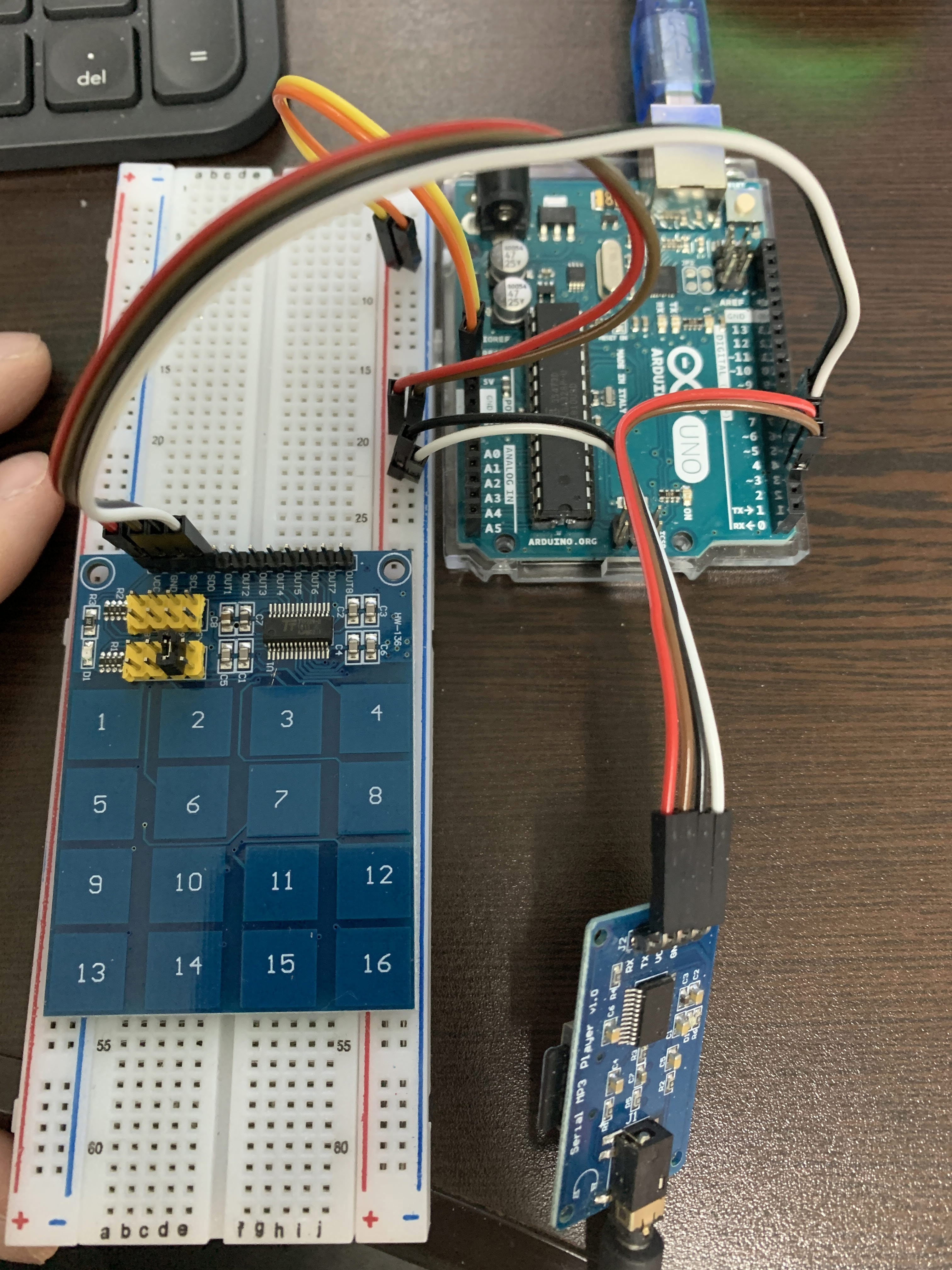
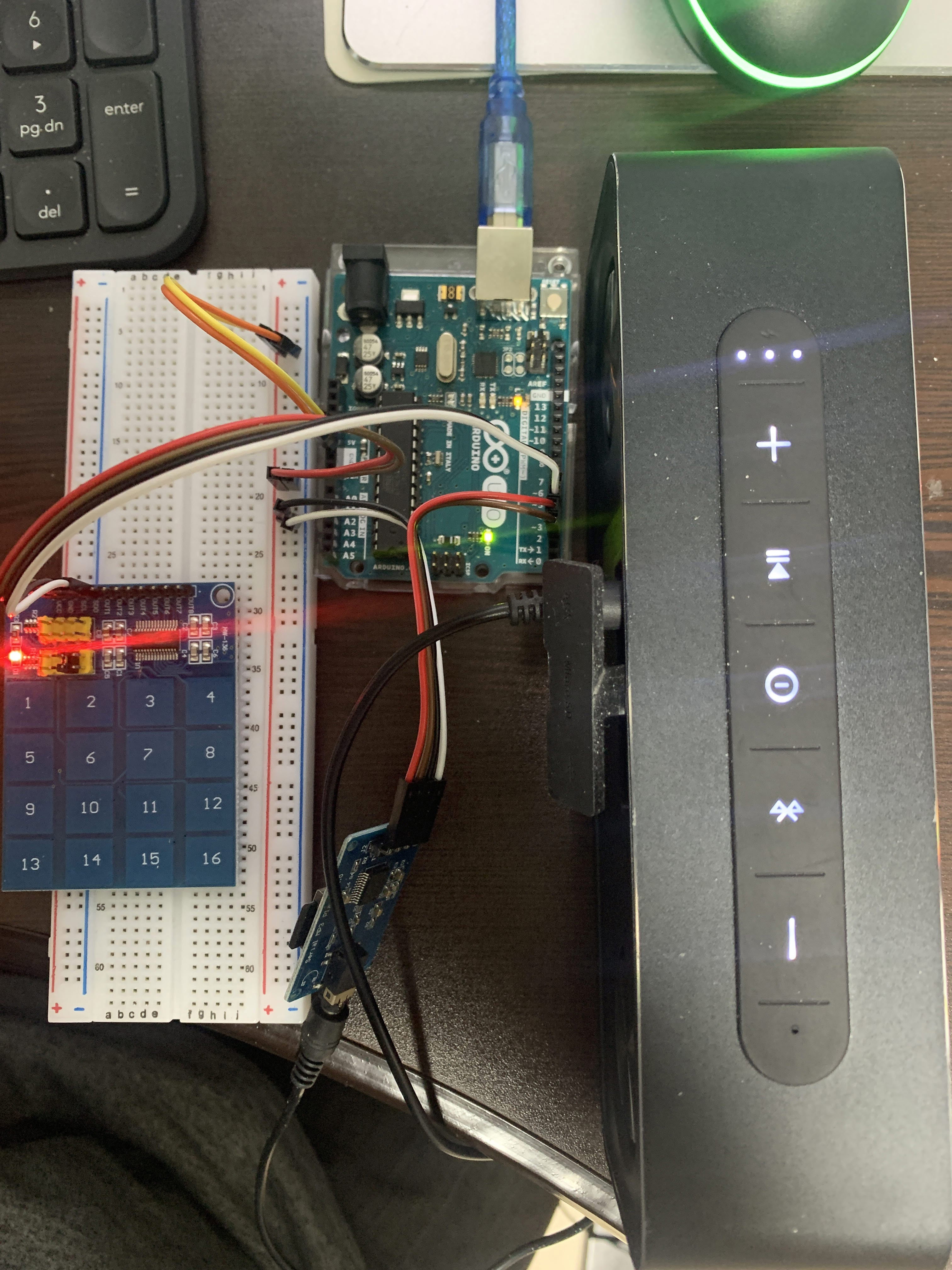
|
//code rearranged by Javier Muñoz 10/11/2016 ask me at javimusama@hotmail.com
#include <SoftwareSerial.h>
#define ARDUINO_RX 2//should connect to TX of the Serial MP3 Player module
#define ARDUINO_TX 3//connect to RX of the module
SoftwareSerial mySerial(ARDUINO_RX, ARDUINO_TX);//init the serial protocol, tell to myserial wich pins are TX and RX
#define SCL_PIN 5
#define SDO_PIN 4
////////////////////////////////////////////////////////////////////////////////////
//all the commands needed in the datasheet(http://geekmatic.in.ua/pdf/Catalex_MP3_board.pdf)
static int8_t Send_buf[8] = {0} ;//The MP3 player undestands orders in a 8 int string
//0X7E FF 06 command 00 00 00 EF;(if command =01 next song order)
#define NEXT_SONG 0X01
#define PREV_SONG 0X02
#define CMD_PLAY_W_INDEX 0X03 //DATA IS REQUIRED (number of song)
#define VOLUME_UP_ONE 0X04
#define VOLUME_DOWN_ONE 0X05
#define CMD_SET_VOLUME 0X06//DATA IS REQUIRED (number of volume from 0 up to 30(0x1E))
#define SET_DAC 0X17
#define CMD_PLAY_WITHVOLUME 0X22 //data is needed 0x7E 06 22 00 xx yy EF;(xx volume)(yy number of song)
#define CMD_SEL_DEV 0X09 //SELECT STORAGE DEVICE, DATA IS REQUIRED
#define DEV_TF 0X02 //HELLO,IM THE DATA REQUIRED
#define SLEEP_MODE_START 0X0A
#define SLEEP_MODE_WAKEUP 0X0B
#define CMD_RESET 0X0C//CHIP RESET
#define CMD_PLAY 0X0D //RESUME PLAYBACK
#define CMD_PAUSE 0X0E //PLAYBACK IS PAUSED
#define CMD_PLAY_WITHFOLDER 0X0F//DATA IS NEEDED, 0x7E 06 0F 00 01 02 EF;(play the song with the directory \01\002xxxxxx.mp3
#define STOP_PLAY 0X16
#define PLAY_FOLDER 0X17// data is needed 0x7E 06 17 00 01 XX EF;(play the 01 folder)(value xx we dont care)
#define SET_CYCLEPLAY 0X19//data is needed 00 start; 01 close
#define SET_DAC 0X17//data is needed 00 start DAC OUTPUT;01 DAC no output
////////////////////////////////////////////////////////////////////////////////////
void setup()
{
Serial.begin(9600);//Start our Serial coms for serial monitor in our pc
mySerial.begin(9600);//Start our Serial coms for THE MP3
/* Configure the clock and data pins */
pinMode(SCL_PIN, OUTPUT);
pinMode(SDO_PIN, INPUT);
delay(500);//Wait chip initialization is complete
sendCommand(CMD_SEL_DEV, DEV_TF);//select the TF card
delay(200);//wait for 200ms
}
void loop()
{
int menuType =-1;
// menuType = serial_command();
menuType = Read_Keypad();
if(menuType > 0 && menuType < 6)
{
Serial.print(" Selected" );
if(menuType ==1)
{
sendCommand(CMD_PLAY_WITHVOLUME, 0X0F02);//play the first song with volume 15 class
}
else if(menuType ==2)
{
sendCommand(NEXT_SONG, 0X0000);
}
else if(menuType ==3)
{
sendCommand(PREV_SONG, 0X0000);
}
else if(menuType ==4)
{
sendCommand(VOLUME_UP_ONE, 0X0000);
}
else if(menuType ==5)
{
sendCommand(VOLUME_DOWN_ONE, 0X0000);
}
Serial.print(" Complete\r\n");
delay(100);
}
delay(100);
return ;
}
int serial_command()
{
int menuType;
char message[25];
serial_command(message);
menuType = atoi(message);//문자열을 숫자로
return menuType;
}
void serial_command(char* buf)
{
int tempPos = 0;
while( 1)
{
while(Serial.available())
{
if (tempPos < 1000) { buf[tempPos] = c; tempPos++; }
}
buf[tempPos] = '\0';
if (tempPos > 0 && buf[tempPos-2]=='\r' && buf[tempPos-1]=='\n') break;
}
return ;
}
void sendCommand(int8_t command, int16_t dat)
{
delay(20);
Send_buf[0] = 0x7e; //starting byte
Send_buf[1] = 0xff; //version
Send_buf[2] = 0x06; //the number of bytes of the command without starting byte and ending byte
Send_buf[3] = command; //
Send_buf[4] = 0x00;//0x00 = no feedback, 0x01 = feedback
Send_buf[5] = (int8_t)(dat >> 8);//datah
Send_buf[6] = (int8_t)(dat); //datal
Send_buf[7] = 0xef; //ending byte
for(uint8_t i=0; i<8; i++)//
{
mySerial.write(Send_buf[i]) ;//send bit to serial mp3
}
//Serial.println();
}
void display_menu()
{
Serial.print("==========MP3 PLAY 프로그램==========\n\n");
Serial.print(" SERIAL MP3 module \n");
Serial.print("********************\n");
Serial.print("* 1.play *\n");
Serial.print("* 2.NEXT_SONG *\n");
Serial.print("* 3.PREV_SONG *\n");
Serial.print("* 4.VOLUME_UP_ONE *\n");
Serial.print("* 5.VOLUME_DOWN_ONE *\n");
Serial.print("********************\n");
Serial.print("메뉴을 선택하세요 : ");
}
/* Read the state of the keypad */
byte Read_Keypad(void)
{
byte Count;
byte Key_State = 0;
/* Pulse the clock pin 8 times (one for each key of the keypad)
and read the state of the data pin on each pulse */
for(Count = 1; Count <= 16; Count++)
{
digitalWrite(SCL_PIN, LOW);
/* If the data pin is low (active low mode) then store the
current key number */
if (!digitalRead(SDO_PIN))
{
Key_State = Count;
digitalWrite(SCL_PIN, HIGH);
break;
}
digitalWrite(SCL_PIN, HIGH);
}
return Key_State;
}
http://colorscripter.com/info#e" target="_blank" style="color:#e5e5e5text-decoration:none">Colored by Color Scripter
|
'아두이노' 카테고리의 다른 글
| 아두이노와 달력 - #2 (0) | 2020.03.01 |
|---|---|
| 아두이노와 달력 - #1 (0) | 2020.03.01 |
| 아두이노 버턴과 키패드- #2 (0) | 2020.02.23 |
| 아두이노 버턴과 키패드- #1 (0) | 2020.02.23 |
| 아두이노 Serial MP3 모듈 -#3 (2) | 2020.02.06 |
'아두이노' Related Articles
more

